Octopos — August 2026 release notes
A summary of everything new in the August 2026 Octopos release, including the new Sales suite, the Label Designer, four new reports, and a long list of improvements and fixes.
The August 2026 release brings a full Sales suite to Octopos, so you can quote, invoice, collect payment, and review POS orders without leaving the back office. It also adds the Label Designer for shelf labels, four new reports, and a deli scale integration. Below is everything that changed, grouped by what it does for your store.
🆕 New Modules
These are brand-new areas of Octopos. If you have used the app before this release, they will be new items for you and your staff to explore.
Sales Overview — You can now see total sales, outstanding receivables, overdue invoices, open quotes, and pending POS payments on a single dashboard. Filter it by location and date range to check any store or any period. It gives you one place to see where money is sitting instead of opening several reports side by side.
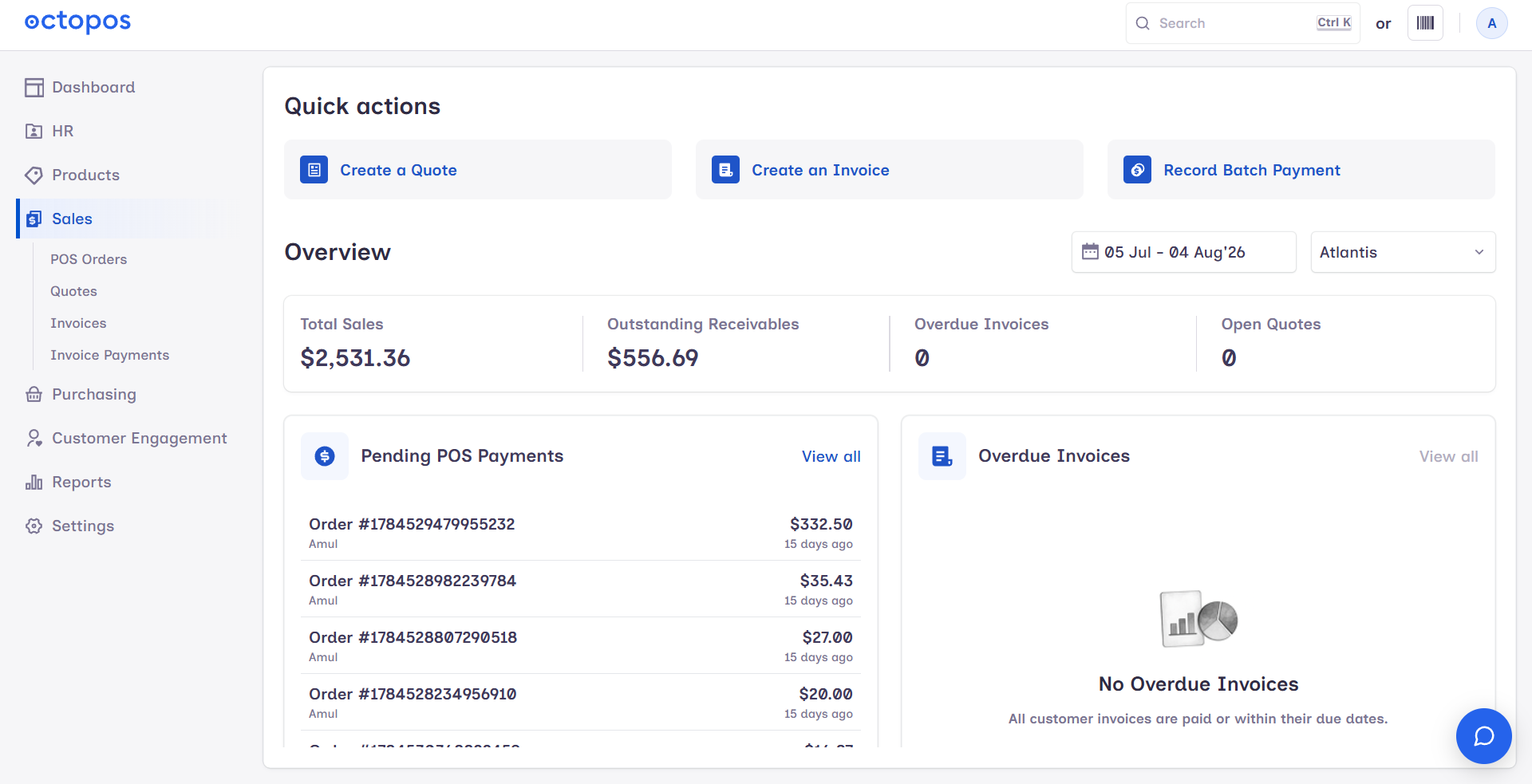
Sales Quotes — You can now create, manage, and track customer quotations in Octopos, then convert an accepted quote into a sales invoice. Nothing has to be retyped when a customer says yes, and you can see which quotes are still open.
Sales Invoices — You can now create, edit, confirm, pay, credit, and void customer invoices. Each invoice can be exported as a PDF to send or print, and you can share a payment link so the customer pays without calling the store.
Sales Invoice Payments — You can record a customer payment and allocate it across one or more unpaid invoices, which makes it easier to handle customers who settle several invoices with a single cheque or transfer. Payments can also be voided if they were entered in error, and payment links are supported here too.
Sales POS Orders — You can now view, filter, and export your POS and online orders in one list, with the full detail behind each order: line items, payments, refunds, and reward details. It is useful for answering customer questions about a past sale and for pulling a set of orders out for your own records.
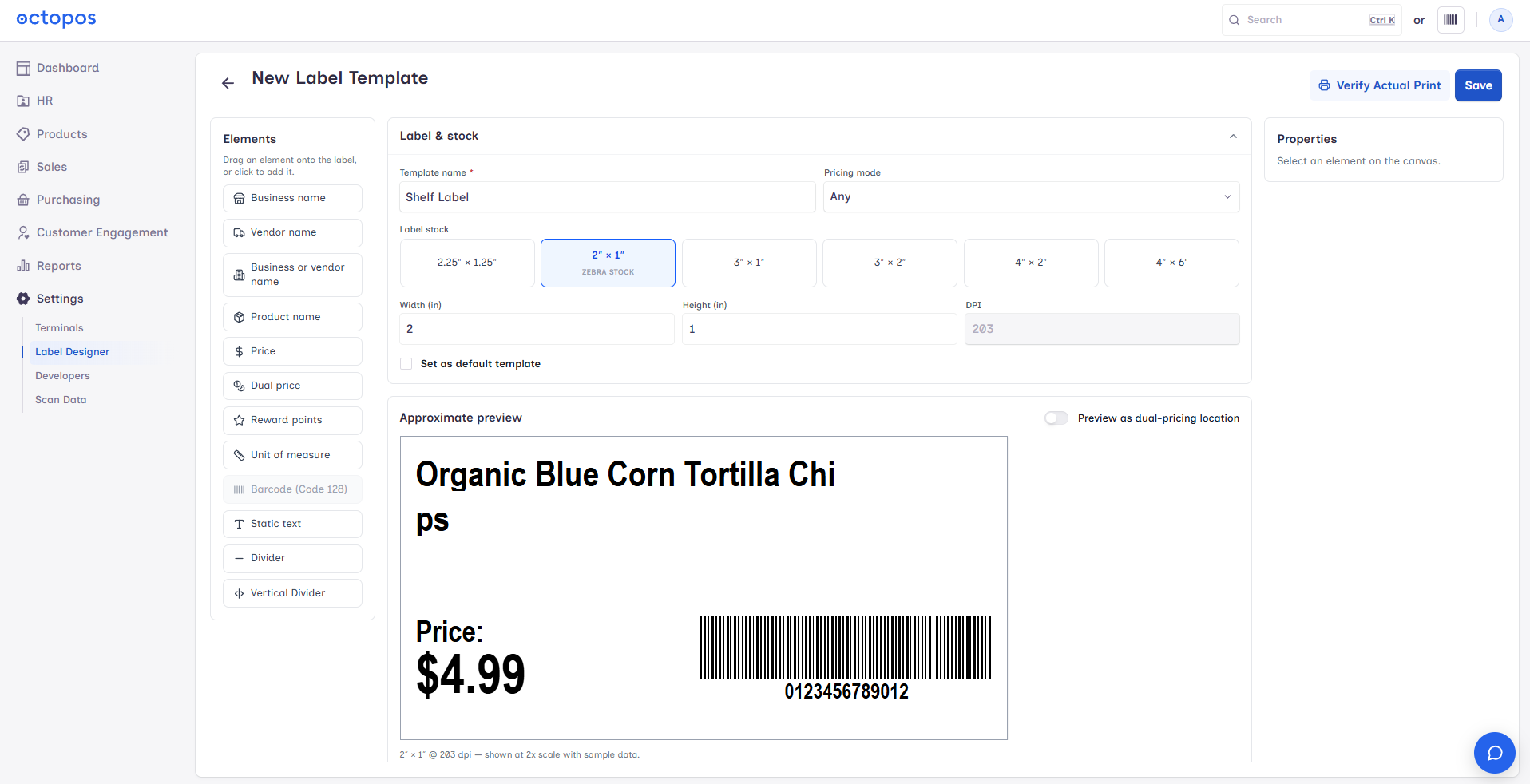
Label Designer — You can now design and manage your own shelf-label templates using a drag-and-drop layout editor with a live preview, so you see the label as you build it. You can also set which template is the default, so day-to-day label printing uses the right layout without anyone choosing it each time.
CAS CL-3000 Deli Scale Integration — If you run a deli counter with CAS CL-3000 scales, you can now sync product names and prices from the back office straight to the scales over your network. Price changes are made once in Octopos instead of being keyed into each scale by hand.
📊 New Reports
Four new reports were added this release. They appear alongside your existing reports and use the same date filters.
Expiring Products Report — You can now see which products are nearing their expiration date so you can mark them down, move them to the front, or return them before they become waste. It works best alongside the new product expiry date fields described below.
Lottery Reconciliation Report — You can now track lottery sales in Octopos and reconcile them against your own records, which shortens the end-of-day or end-of-week lottery count and makes gaps easier to spot.
Active TPR Barcodes Report — You can now see every Temporary Price Reduction (TPR) barcode that is currently active in one place. It is a quick way to confirm which promotional prices are live before you print signage or investigate a price question at the register.
Product Purchase History — You can now pull the full purchase history for any product, so you can see what you have paid over time and how often you have reordered it. That makes it easier to spot rising costs and to check a supplier's pricing before you place the next order.
✨ Enhancements & Improvements
These are changes to features you already use.
TPR (Temporary Price Reduction) — You can now run temporary price reductions with their own dedicated barcodes, so a promotional price can be scanned and tracked separately from the product's normal price. The new Active TPR Barcodes Report gives you a live view of what is running.
Unit of Measure (UOM) cost calculation — Costs for all related units of measure are now worked out automatically from the base unit cost and the conversion quantity. Enter the cost once for the base unit and the case, pack, or other units follow, which removes a common source of costing errors.
Product expiry dates — Products can now carry an expiration date, and a new Expiration Date Reminder setting on the product's inventory tab lets you be warned before that date arrives. This is what feeds the Expiring Products Report.
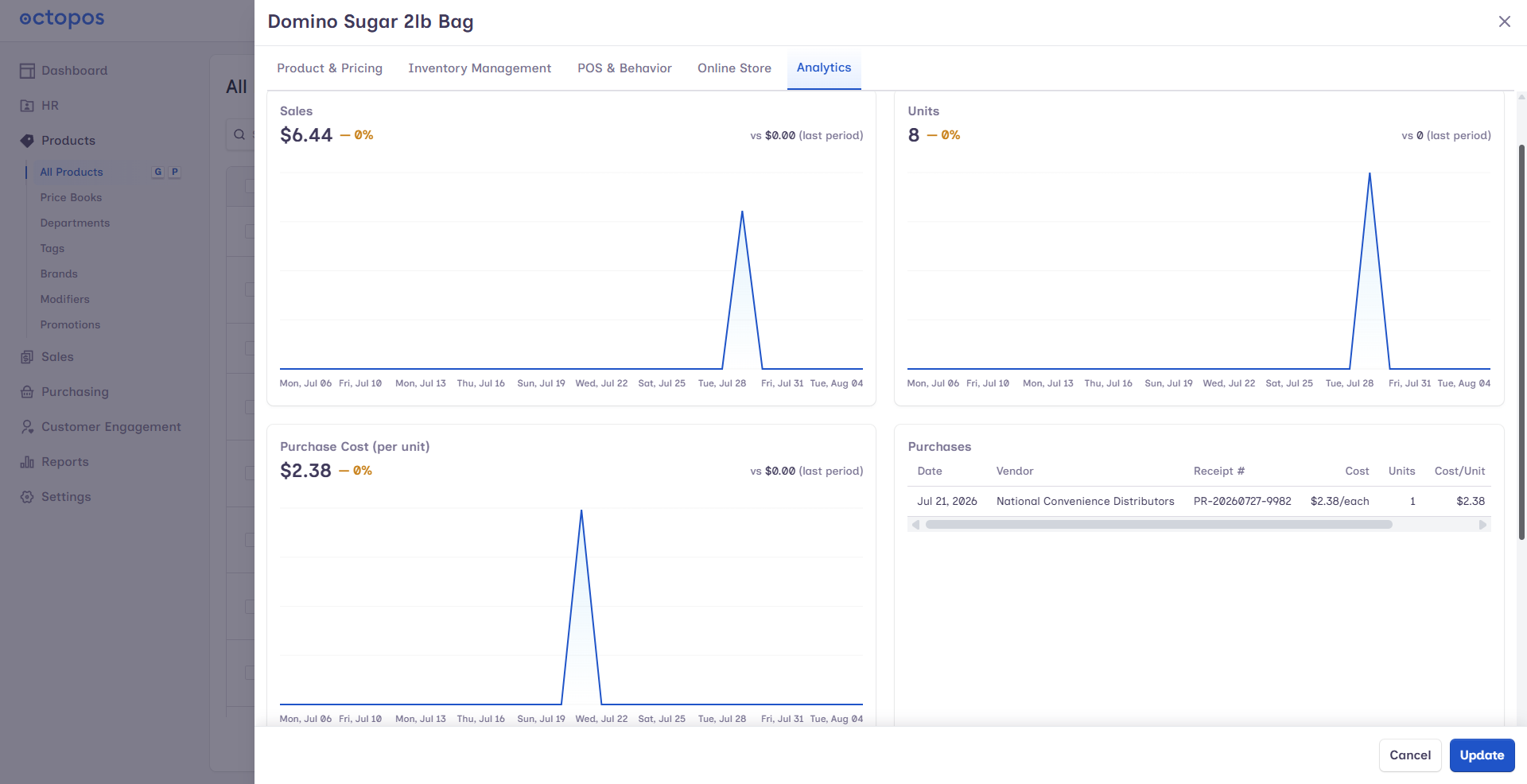
Product editing — The inventory section of a product now includes Reorder Qty and Expiration Date Reminder fields, so reorder points and expiry warnings live with the rest of the stock detail. The Analytics section adds two charts, Purchase Cost (per unit) and Purchase history, giving you cost and buying trends without leaving the product.
Rewards & Members — Member profiles now show the customer's Credit Memo Balance. Staff can see what credit a customer is holding while they are helping them, instead of looking it up separately.
Saved cards for customers — Customers can now securely save a card on file, so repeat purchases and invoice payments take fewer steps at the counter and online.
Authorize.Net online payments — Invoices can now be paid online through Authorize.Net, which means you can send a customer a payment link and have the money collected without a phone call or a trip to the store.
Purchase Receipts & Purchase Bills — You can now download the files attached to a receipt or bill, so supplier paperwork is retrievable when you need it. Both screens also show a total cost summary at the bottom, along with general workflow improvements throughout.
Combined transactions — Payouts and sales can now be combined into a single order transaction. That keeps a customer's payout and purchase together in one record rather than two separate ones.
Inventory Movement & Profitability Report — This report now includes Gross Margin, Profit per Unit, and Gross Profit, so you can see not only what moved but what it actually earned. It makes comparing products and categories on profitability much more direct.
PAX payment terminals — Payment details coming from PAX terminals are now captured more completely and more reliably on both regular orders and gift card orders. Card payment records should match the terminal more closely when you are reconciling.
Expanded POS connectivity — Behind-the-scenes improvements strengthen the connection between your POS terminals and the back office. There is nothing to set up; you should see more consistent behaviour when data moves between the register and the office.
🛠️ Fixes & Polish
Credit invoice fixes — Several problems with credit invoices and credited payments have been resolved, so credits apply and report the way you expect.
Promotions fixes — Promotion priority and multi-use rules now apply correctly, and buy-X-get-discount promotions work properly across different units of measure. Outdated promotions no longer block a sale from completing at the register.
Report date pickers — Start-date and end-date validation messages are now consistent across all reports, so you get the same clear message wherever you pick a date range.
Interface polish — Dialogs across the app can now be closed with the ESC key, and loading indicators were added throughout so you can tell when the app is working. Numerous layout, responsiveness, and PDF design issues were also fixed.
If something from this release is missing
If a new module or report does not appear for you, try these checks before contacting support.
Refresh the browser tab, or sign out and sign back in, so the app picks up the new version.
Confirm you are looking at the correct location, and that the date range on a dashboard or report covers the period you expect to see data for.
Check that the staff member reporting the problem has access to the new area.
For the CAS CL-3000 integration, confirm the scale is powered on and reachable on the same network as the back office before syncing names and prices.
If a feature still does not appear, or a figure does not look right after this update, contact Octopos support with your store name, the location involved, and the screen you were on. Our team is happy to walk you through any of the new Sales screens, the Label Designer, or the new reports.
Also on our support site: Octopos — August 2026 release notes